User Interface
User Interface
After completing the installation, the GUI provided by Pigsty can be accessed through a browser.
http://g.pigsty -> http://10.10.10.10:80 (nginx) -> http://10.10.10.10:3000 (grafana)
Visit http://<node_ip>:3000 to browse Pigsty home (username: admin, password: pigsty)
You can visit http://demo.pigsty.cc to view the public Pigsty Demo and browse through the features provided by the Pigsty Monitoring System.
Web Services
Pigsty will provide services to the public through a series of ports, and web services will be accessed uniformly through Nginx port 80.
| Component | Port | Default Domain | Description |
|---|---|---|---|
| Grafana | 3000 | g.pigsty |
Pigsty Monitoring System GUI |
| Prometheus | 9090 | p.pigsty |
Monitoring Timing Database |
| Loki | 3100 | l.pigsty |
Log collection server (no interface) |
| AlertManager | 9093 | a.pigsty |
Alarm aggregation management component |
| Consul | 8500 | c.pigsty |
Distributed Config Management, Service Discovery |
| Consul DNS | 8600 | - | Consul-provided DNS services |
| Nginx | 80 | pigsty |
Entry proxy for all services |
| Yum Repo | 80 | yum.pigsty |
Local Yum repos |
| Haproxy Index | 123 | h.pigsty |
Access proxy for all Haproxy management interfaces |
| NTP | 123 | n.pigsty |
The NTP time server used uniformly by the environment |
| Dnsmasq | 53 | - | The DNS name resolution server used by the environment |
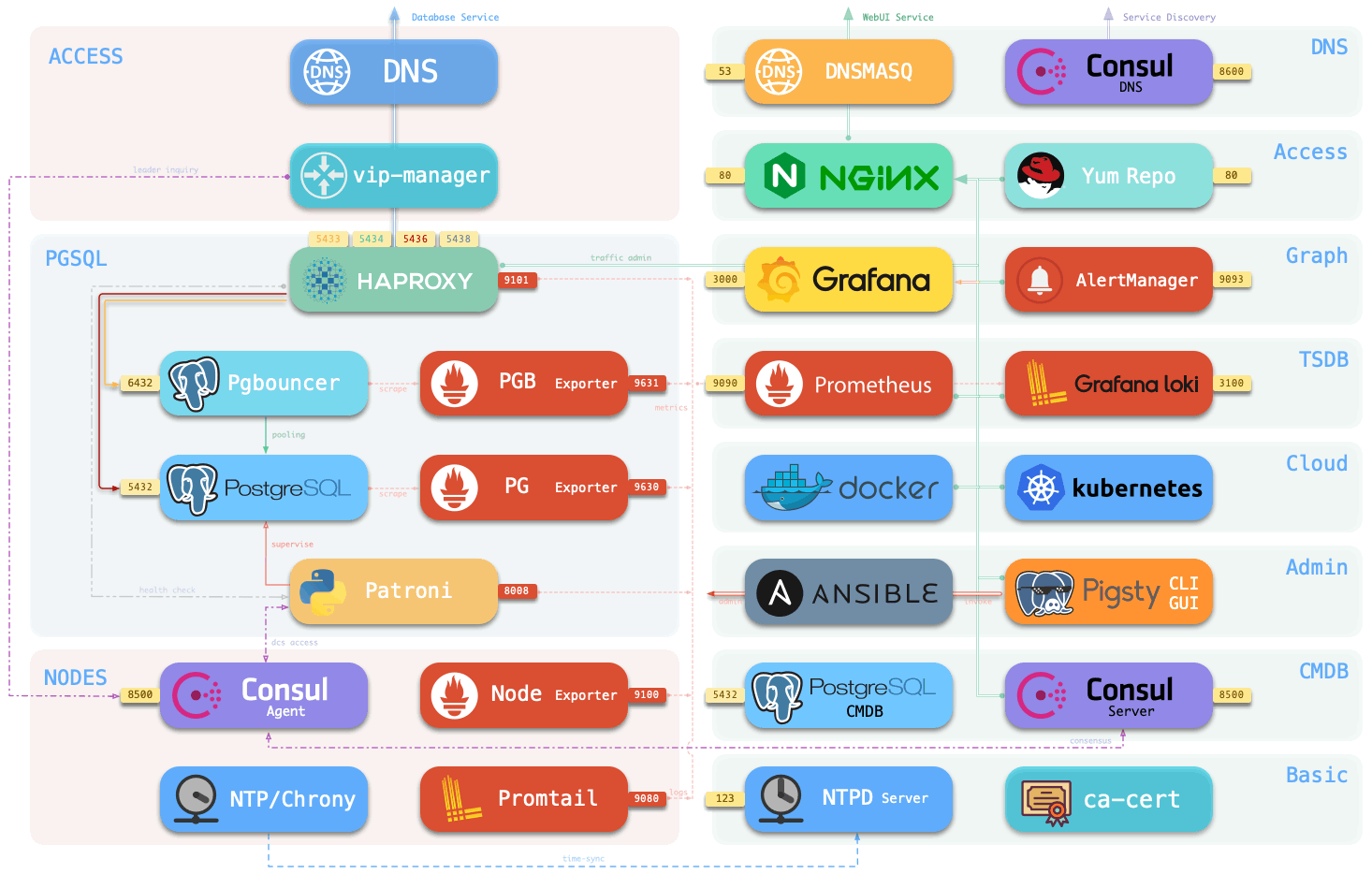
Users can configure their own existing domain names for these services, or use the make dns shortcut to write the default domain names to /etc/hosts.
Users can still access most services directly using the IP: Port method, for example, the entry point to the Pigsty monitoring system is the meta node IP+3000 port.
Note that if Consul is used as the DCS, the Consul UI must be accessed through the Nginx domain. Consul listens on port 127.0.0.1, a deliberate design for security reasons: Consul contains sensitive metadata that should not be exposed directly to the public.
Demo
Pigsty provides a public demo at: http://demo.pigsty.cc
Because the demo instance is an empty virtual machine with 1 core and 1GB, the display is thin, so please refer to the actual effect.