Version v1.5.1 of the documentation is no longer actively maintained. The site that you are currently viewing is an archived snapshot. For up-to-date documentation, see the latest version.
Concept: Nodes
Pigsty use nodes for deployment, nodes cloud be physical machines, VMs, or even Pods.
Pigsty has two types of nodes: meta node and (normal) node.
Meta nodes are used to initiate control, and (normal) nodes are managed under control.
- Meta node: Run
infra.ymlplaybook to install Pigsty, INFRA, NODES, and PGSQL modules. - Node: Run
nodes.ymlplaybook to join Pigsty, and install the NODES module by default.
Meta Node
Meta-Nodes are nodes installed with Pigsty, with admin capability and a complete infra set.
Current node are marked as meta during ./configure, populated in the meta group of inventory.
Pigsty requires at least one meta node per environment. It will be used as a command center for the entire environment. It’s the meta node’s responsibility to keep states, manage configs, launch plays, run tasks, and collect metrics & logs. The infra set is deployed on meta nodes by default: Nginx, Grafana, Prometheus, Alertmanager, NTP, DNS Nameserver, and DCS.
Reuse Meta Node
The meta node can also be reused as a common node, and a PostgreSQL cluster named pg-meta is created by default on the meta. Supporting additional features: CMDB, routine tasks report, extended apps, log analysis & data analysis, etc.
Taking Pigsty Sandbox as an example, the distribution of components on the nodes is shown below.
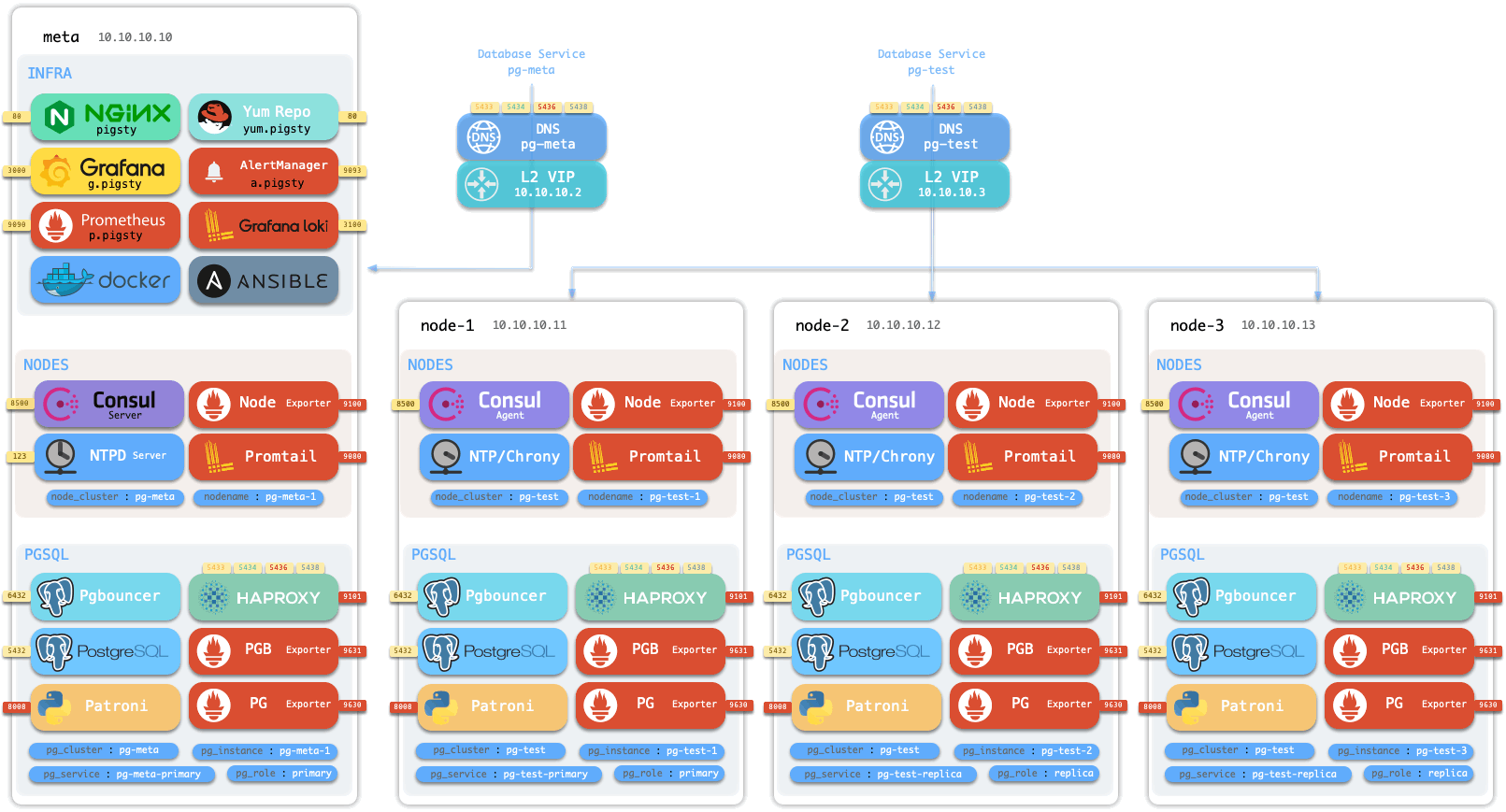
The sandbox consists of a meta node with 4 nodes. The sandbox is deployed with one set of infra and 2 database clusters. meta is the meta node, deployed with infra and reused as a regular node, deployed with meta DB cluster pg-meta. node-1, node-2, and node-3 are normal nodes deployed with cluster pg-test.
Meta Node Service
The services running on the meta node are shown below.
| Component | Port | Description | Default Domain |
|---|---|---|---|
| Nginx | 80 | Web Service Portal | pigsty |
| Yum | 80 | LocalYum Repo | yum.pigsty |
| Grafana | 3000 | Monitoring Dashboards/Visualization Platform | g.pigsty |
| AlertManager | 9093 | Alert aggregation & notification service | a.pigsty |
| Prometheus | 9090 | Monitoring Time-Series Database | p.pigsty |
| Loki | 3100 | Logging Database | l.pigsty |
| Consul (Server) | 8500 | Distributed Configuration Management and Service Discovery | c.pigsty |
| Docker | 2375 | Container Platform | - |
| PostgreSQL | 5432 | Pigsty CMDB | - |
| lAnsible | - | Controller | - |
| Consul DNS | 8600 | DNS Service Discovery powered by Consul | - |
| Dnsmasq | 53 | DNS Name Server(Optional) | - |
| NTP | 123 | NTP Time Server(Optional) | - |
| Pgbouncer | 6432 | Pgbouncer Connection Pooling Service | - |
| Patroni | 8008 | Patroni HA Component | - |
| Haproxy Primary | 5433 | Primary Pooling: Read/Write Service | - |
| Haproxy Replica | 5434 | Replica Pooling: Read-Only Service | - |
| Haproxy Default | 5436 | Primary Direct Connect Service | - |
| Haproxy Offline | 5438 | Offline Direct Connect: Offline Read Service | - |
| Haproxy Admin | 9101 | HAProxy admin & metrics | - |
| PG Exporter | 9630 | PG Monitoring Metrics Exporter | - |
| PGBouncer Exporter | 9631 | PGBouncer Monitoring Metrics Exporter | - |
| Node Exporter | 9100 | Node monitoring metrics | - |
| Promtail | 9080 | Logger agent | - |
| vip-manager | - | Bind VIP to the primary |
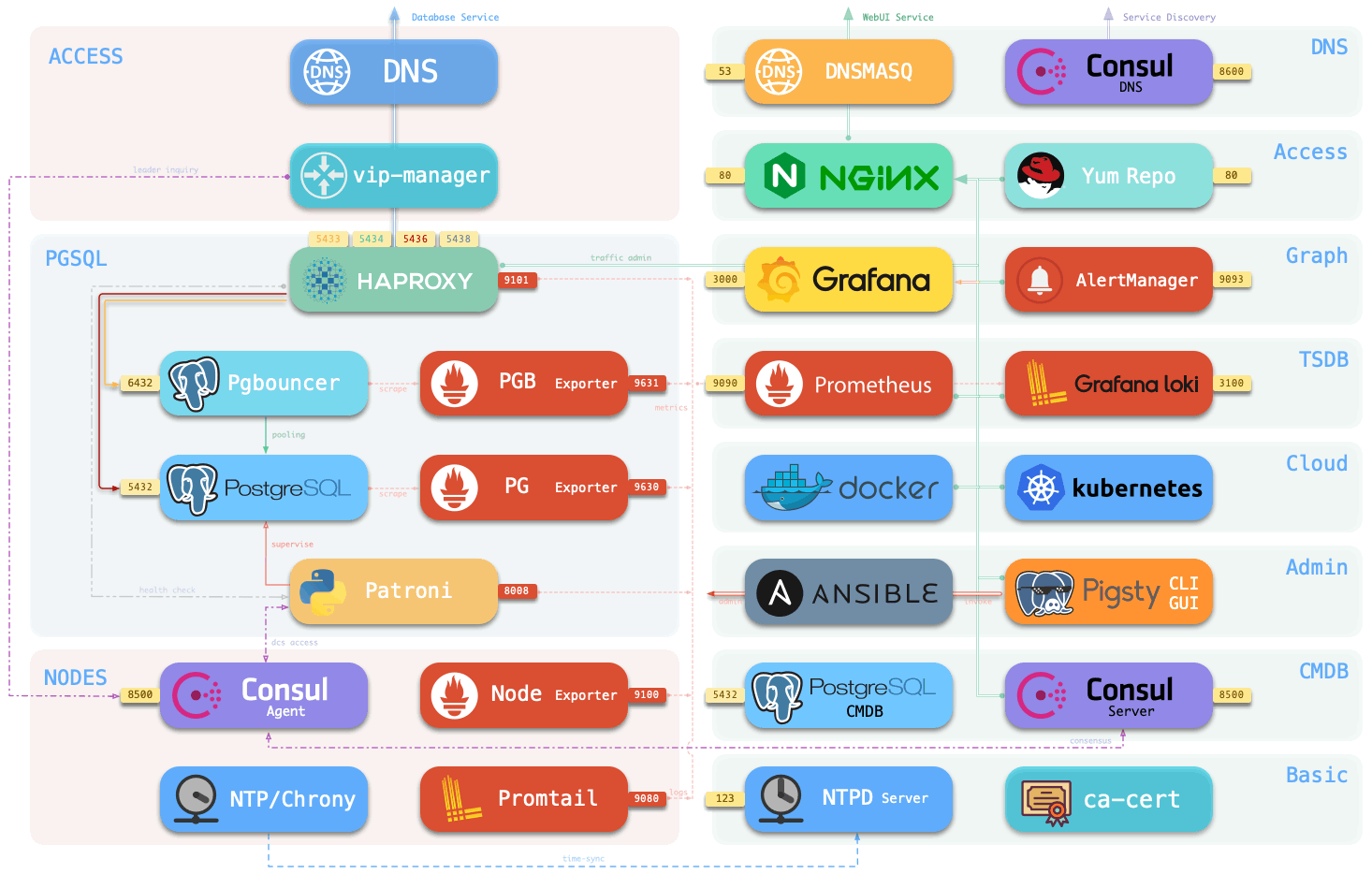
Meta Node & DCS
By default, DCS Servers (Consul or Etcd) will be deployed on the meta nodes, or you can use External DCS Cluster. Any infra outside DCS will be deployed on the meta node as a peer-to-peer copy. The number of meta nodes requires a minimum of 1, recommends 3, and recommends no more than 5.
DCS Servers are used for leader election in HA Scenarios. Shutting down the DCS servers will demote ALL clusters, which reject any writes by default! So make sure you have enough availability on these DCS Servers, at least stronger than PostgreSQL itself. It’s recommended to add more meta nodes or use an external independently maintained, HA DCS cluster for production-grade deployment.
Multiple Meta Nodes
Usually, one meta node is sufficient for basic usage, two meta nodes can be used as standby backup, and 3 meta nodes can support a minimal meaningful production-grade DCS Servers themselves!
Pigsty will set DCS Servers on all meta nodes by default for the sake of “Battery-Included”. But it’s meaningless to have more than 3 meta nodes. If you are seeking HA DCS Servies. Using an external DCS Cluster with 3~5 nodes would be more appropriate.
Meta nodes are configured under all.children.meta.host in the inventory. They will be marked with meta_node: true flag. The node runs configure will be marked as meta, and multiple meta nodes have to be configured manually, check pigsty-dcs3.yml for example.
If you are not using any external DCS as an arbiter. It requires at least 3 nodes to form a meaningful HA Cluster that allows one node failure.
Node
You can manage more nodes with Pigsty, and use them to deploy various databases or your applications.
The nodes managed by Pigsty are adjusted by nodes.yml to the state described by Config: NODES, and the node monitoring and log collection components are installed so you can check the node status and logs from the monitoring system.
Node Identity
Each node has identity parameters that are configured by parameters in <cluster>.hosts and <cluster>.vars.
There are two important node identity parameters: nodename and node_cluster, which will be used as the node’s instance identity (ins) and cluster identity (cls) in the monitoring system. nodename and node_cluster are NOT REQUIRED since they all have proper default values: Hostname and constant nodes.
Besides, Pigsty uses an IP address as a unique node identifier, too. Which is the inventory_hostname reflected as the key in the <cluster>.hosts object. A node may have multiple interfaces & IP addresses. But you must explicitly designate one as the PRIMARY IP ADDRESS. Which should be an intranet IP for service access. It’s not mandatory to use that same IP address to ssh from the meta node, you can use ssh tunnel & jump server with Ansible Connect parameters.
| Name | Type | Level | Attribute | Description |
|---|---|---|---|---|
inventory_hostname |
ip |
- | REQUIRED | Node IP |
nodename |
string |
I | Optional | Node Name |
node_cluster |
string |
C | Optional | Node Cluster Name |
The following cluster configuration declares a three-node cluster.
| host | node_cluster | nodename | instance |
|---|---|---|---|
10.10.10.11 |
node-test |
node-test-1 |
pg-test-1 |
10.10.10.12 |
node-test |
pg-test-2 |
pg-test-2 |
10.10.10.13 |
node-test |
node-3 |
pg-test-3 |
IIn the monitoring system, the time-series monitoring data are labeled as follows.
Node Services
| Component | Port | Description |
|---|---|---|
| Consul Agent | 8500 | Distributed Configuration Management and Service Discovery |
| Node Exporter | 9100 | Node Monitoring Metrics Exporter |
| Promtail | 9080 | Collection of Postgres, Pgbouncer, Patroni logs (Optional) |
| Consul DNS | 8600 | DNS Service |
PGSQL Node
A PGSQL Node is a node with a PGSQL module installed.
Pigsty uses exclusively deploy policy for PGSQL. This means the node’s identity and pgsql’s identity are exchangeable. The pg_hostname parameter is designed to assign the Postgres identity to its underlying node: pg_instance and pg_cluster will be assigned to the node’s nodename & node_cluster.
In addition to node default services, the following services are available on PGSQL nodes.
| Component | Port | Description |
|---|---|---|
| Postgres | 5432 | Pigsty CMDB |
| Pgbouncer | 6432 | Pgbouncer Connection Pooling Service |
| Patroni | 8008 | Patroni HA Component |
| Consul | 8500 | Distributed Configuration Management and Service Discovery |
| Haproxy Primary | 5433 | Primary connection pool: Read/Write Service |
| Haproxy Replica | 5434 | Replica connection pool: Read-only Service |
| Haproxy Default | 5436 | Primary Direct Connect Service |
| Haproxy Offline | 5438 | Offline Direct Connect: Offline Read Service |
Haproxy service |
543x | Customized Services |
| Haproxy Admin | 9101 | Monitoring metrics and traffic management |
| PG Exporter | 9630 | PG Monitoring Metrics Exporter |
| PGBouncer Exporter | 9631 | PGBouncer Monitoring Metrics Exporter |
| Node Exporter | 9100 | Node Monitoring Metrics Exporter |
| Promtail | 9080 | Collection of Postgres, Pgbouncer, Patroni logs (Optional) |
| Consul DNS | 8600 | DNS Service |
| vip-manager | - | Bind VIP to the primary |
Node Interaction
Here’s an example of interactions between a meta node & a common node.
The interaction between the meta node and common nodes are:
- Database cluster/node domain name resolved by Nameserver on meta node. (optional)
- Database node software installation will use Yum Repo on meta.
- Prometheus collects database cluster/node monitoring metrics on meta.
- Database logs are collected by Promtail and sent to Loki.
- Pigsty will control database nodes from the meta node:
- Cluster creation, scale in / scale out, instance/cluster recycling
- Creating business users & databases, modifying services routes & HBA rules.
- Log collection, vacuum analyze, backup, and other routine tasks, etc.
- Node’s Consul will sync locally registered services to the DCS Servers.
- The database node will synchronize time from the meta node (or other NTP server).