Version v1.5.1 of the documentation is no longer actively maintained. The site that you are currently viewing is an archived snapshot. For up-to-date documentation, see the latest version.
PGSQL Service & Access
Defining PostgreSQL service and achieving stable, reliable, and HA access through LB and connection pooling.
The concepts of Service and Access are proposed for HA PostgreSQL clusters.
Personal User
After completing the singleton deployment, port 5432 of this node provides PostgreSQL services, and port 80 provides UI class services.
On the current meta node, executing psql with no parameters using the admin user can connect directly to the local pre-defined meta database.
When accessing PG from the host using the client tool, you can use the URL.
You can use the admin user specified by pg_admin_username and pg_admin_password or a business user (dbuser_meta) pre-defined in the meta database to access this database.
When using a HA database cluster deployed with Pigsty, it is not recommended to access the database service using IP direct connection.
Service
Service in the form of functionality that a database cluster provides.
In a production env, a replication-based primary-replica database cluster is used. There is one and only one primary in the cluster that can accept writes, while the other replicas will continuously get logs from the primary to keep up with it. Also, replicas can host read-only requests.
In addition, for production envs with short high-frequency connections, we also pool requests via Pgbouncer to reduce connection creation overhead. However, in ETL and change execution scenarios, we need to bypass the connection pool and access the database directly.
In addition, HA clusters have a failover feature that causes changes to the cluster’s primary. HA clustering solutions, therefore, require that write traffic can automatically adapt to changes in the cluster’s primary.
These different access requirements (read/write separation, pooling, and direct connection, failover auto-adaptation) are eventually abstracted into the concept of Service.
In general, a database cluster must provide a service.
- read-write service (primary): can write to the database
For a production database cluster, at least two services should be provided.
-
read-write service (primary): can write to the database
-
read-only service (replica): access to the replica
There may be other services.
- offline: For ETL and personal queries.
- standby: Read-only service with synchronous commit and no replication delay.
- delayed: Allows to access old data before a fixed time interval.
- default: Service that allows admin users to manage the database directly, bypassing the connection pool.
Default Services
Pigsty provides four services by default: primary, replica, default, and offline.
New services can be defined for global or individual clusters via config files.
| service | port | purpose | description |
|---|---|---|---|
| primary | 5433 | production read/write | connect to primary via connection pool |
| replica | 5434 | production read-only | connection to replica via connection pool |
| default | 5436 | management | direct connection to primary |
| offline | 5438 | ETL/personal user | direct connection to offline |
Take the meta DB pg-meta as an example:
These four services are described in detail below.
Primary Service
The Primary service is used for online production read and write access, and it maps the cluster’s port 5433 to the primary connection pool (default 6432) port.
The Primary service selects all instances in the cluster as members, but only the primary can take on traffic because there is one and only one instance /primary with a true health check.
The HA component Patroni on the primary returns 200 against the Primary health check and is used to ensure that the cluster does not have another primary.
When the cluster fails over, the health check is true for the new primary and false for the old one, so traffic is migrated to the new primary. The business side will notice about 30 seconds of Primary service unavailability time.
Replica Service
The Replica service is used to online produce read-only access, and it maps the cluster’s port 5434, to the replica connection pool (default 6432) port.
The Replica service selects all instances in the cluster as members, but only those with an accurate health check /read-only can take on traffic, and that health check returns success for all instances that can take on read-only traffic.
By default, only replicas carry read-only requests, and the Replica service defines selector_backup, a selector that adds the cluster’s primary as a backup instance to the Replica service. The primary will only start taking read-only traffic when all replicas are down.
Another role as a backup instance is offline, which is usually dedicated to OLAP/ETL/personal queries and is not suitable for mixing with online queries, so offline is only used to take on read-only traffic when all replicas are down.
Default Service
The Default service is used for online primary direct connections, which map the cluster’s port 5436 to the primary Postgres (default 5432) port.
Default service targets interactive read and writes access, including executing admin commands, performing DDL changes, connecting to the primary to perform DML, and performing CDC. Default service forwards traffic directly to Postgres, bypassing Pgbouncer.
The Default service is similar to the Primary service, using the same config entry.
Offline Service
Offline service is used for offline access and personal queries. It maps the cluster’s 5438 port, to the offline Postgres (default 5432) port.
The Offline service targets interactive read-only access, including ETL, offline analytics queries, and individual user queries. Offline service also forwards traffic directly to Postgres, bypassing Pgbouncer.
Offline instances are those where pg_role is offline or tagged with pg_offline_query. The other replica outside the Offline will act as a backup instance for Offline and will still be able to get services from other replicas when the Offline is down.
User-Defined Service
In addition to the default services configured by pg_services above, users can define additional services for the PostgreSQL cluster in the pg_services_extra config entry.
A cluster can define multiple services, each containing any number of cluster members, distinguished by port. The following code defines a new service standby that uses port 5435 to provide sync read functionality. This service will read from standby (or primary) in the cluster, thus ensuring that all reads are done without latency.
Required
-
Name (
service.name).The full name of the service is prefixed by the database cluster name and suffixed by
service.name, connected by-. -
Port (
service.port).In Pigsty, services are exposed as NodePort by default, so the port is mandatory. However, if you use an LB service access scheme, you can also differentiate the services in other ways.
-
selector (
service.selector).The selector specifies the instance members of the service, in the form of JMESPath, filtering variables from all cluster instances. The default
[]selector picks all cluster members.
Optional
-
backup selector (
service.selector).The backup selector selects or marks the list of instances for service backup, i.e., the backup instance takes over the service only when all other members of the cluster fail.
-
source_ip (
service.src_ip).Indicates the IP used externally by the service. The default is
*, which is all IP on the localhost. Usingvipwill use thevip_addressvariable to take the value, or you can also fill in the specific IP supported by the NIC. -
Host port (
service.dst_port).Indicates which port the service’s traffic will be directed to on the target instance.
postgreswill point to the port the database is listening on,pgbouncerwill point to the port the connection pool is listening on, or you can fill in a fixed port. -
health check method (
service.check_method):How does the service check the health status of the instance? Currently, only HTTP is supported.
-
Health check port (
service.check_port):Which port does the service check the instance on to get the health status of the instance?
patroniwill get it from Patroni (default 8008),pg_exporterwill get it from PG Exporter (default 9630), or the user can fill in a custom port. -
Health check path (
service.check_url):The URL PATH is used by the service to perform HTTP checks.
/is used by default for health checks, and PG Exporter and Patroni provide a variety of health check methods that can be used to differentiate between primary and replica traffic. For example,/primarywill only return success for the primary, and/replicawill only return success for the replica./read-only, on the other hand, will return success for any instance that supports read-only (including the primary). -
health check code (
service.check_code):The code expected for HTTP health checks, default, is 200.
-
Haproxy-specific configuration (
service.haproxy) :Proprietary config entries about the service provisioning software (HAProxy).
Service Implementation
Pigsty currently uses HAProxy-based service implementation by default and provides a sample implementation based on Layer 4 LB (L4VIP). For details, please refer to the section access.
Access
Access is designed to address high concurrency, HA, and high performance in production envs. Individual users can choose to ignore the access method and access the database directly via IP.
Access default database via
postgres://dbuser_dba:[email protected]:5432/meta(replace IP & password)
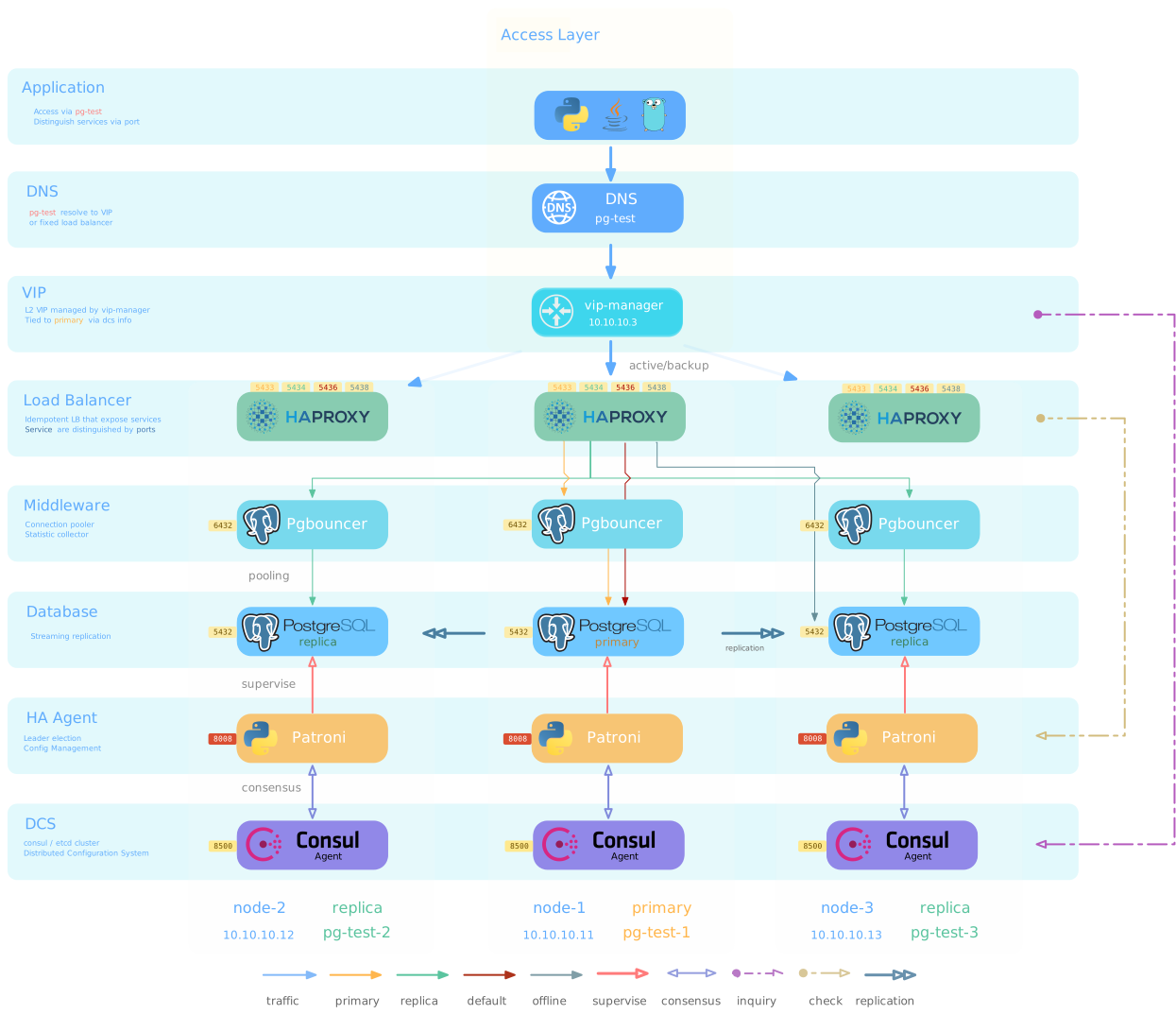
In Pigsty’s default config, a fully functional LB(HAProxy) is deployed on each database instance/node, so that any instance can serve as an access point for the entire cluster. The delivery boundary of a Pigsty cluster stops at the access layer LB(HAProxy); it is up to you to decide Access Policy: how to distribute business traffic to one, multiple, or all load balancing instances.
Pigsty provides a rich set of access methods. The Pigsty sandbox uses an L2 VIP bound to the primary and a domain name attached to that VIP as a sample. The application accesses the load-balancing instance on the primary through the L2 VIP via the domain name. When this node becomes unavailable, the VIP is transferred with the primary, and the traffic is carried by the LB on the new primary, as shown in the following figure.
Another classic policy is to use DNS polling to resolve DNS domain names to all instances, and several common access patterns will be given in this article.
User Interface
The interface that Pigsty ultimately delivers to the user is a database connection string.
The formal difference between the different access methods is the difference between host and port in the connection string.
Port
Pigsty uses different ports to distinguish between database services, which provide Postgres equivalent services, as follows
| port | service | type | description |
|---|---|---|---|
| 5432 | postgres | database | Direct access to the current node database |
| 6432 | pgbouncer | connection pool | Accessing the current node database through a connection pool |
| 5433 | primary | service | Load-balancing and accessing the primary through a connection pool |
| 5434 | replica | service | Load-balancing and accessing the primary through a connection pool |
| 5436 | default | service | Direct access to the primary via load balancing |
| 5438 | offline | service | Direct access to the offline via load balancing |
Host
| type | sample | description |
|---|---|---|
| Cluster domain name | pg-test |
Direct access to the current node database |
| Cluster VIP | 10.10.10.3 |
Access the current node database through a connection pool |
| Instance-specific domain name | pg-test-1 |
Load-balancing and accessing the primary through a connection pool |
| Instance-specific IP | 10.10.10.11 |
Load-balancing and accessing the primary through a connection pool |
| All IP | 10.10,10.11,10.12 |
Use Multihost feature |
Depending on the contents of the host section and the available port, multiple connection strings can be combined.
Available Combinations
The following connection strings are available for the test database on the cluster pg-test in a singleton sandbox.
Available Combinations
At the cluster level, users can access the four default services provided by the cluster via cluster domain + service port. Users can also bypass the domain name and access the database cluster directly using the cluster’s VIP (L2 or L4).
At the instance level, users can connect directly to Postgres via the node IP/domain name + port 5432 or port 6432 to access the database via Pgbouncer. Services provided by the cluster to which the instance belongs can also be accessed via Haproxy via 5433~543x.
Access Method
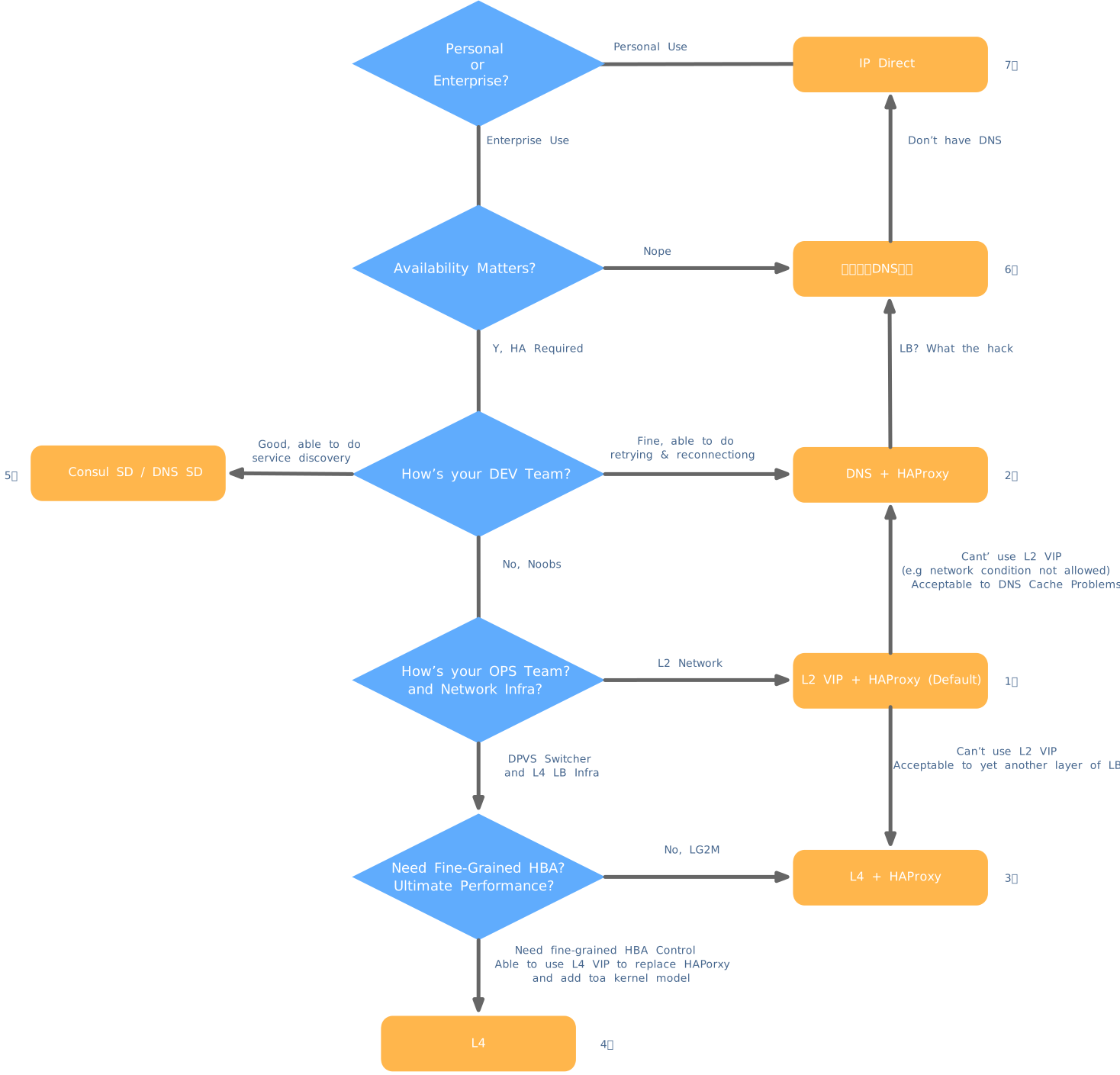
Pigsty recommends using a Haproxy-based access solution (1/2) or, in production envs with infra support, an L4VIP (or equivalent load balancing service) based access solution (3).
| Serial Number | Solution | Description |
|---|---|---|
| 1 | L2VIP + Haproxy | Standard access policy, using L2 VIP to ensure HA of Haproxy |
| 2 | DNS + Haproxy | Standard HA access policy, no single node of system. |
| 3 | L4VIP + Haproxy | A variant of Method 2, using L4 VIP to ensure Haprxoy is HA. |
| 4 | L4 VIP | Large-scale high-performance production envs DPVS L4 VIP access is recommended |
| 5 | Consul DNS | Use Consul DNS for service discovery, bypassing VIPs and Haproxy |
| 6 | Static DNS | Traditional static DNS Access |
| 7 | IP | Using Smart Client Access |
L2 VIP + Haproxy
Solution Description
The standard access method for Pigsty sandboxes uses a single domain name bound to a single L2 VIP, which points to the HAProxy.
The Haproxy uses Node Port to expose service in a unified way. Each Haproxy is an idempotent instance, providing complete load balancing and service distribution. Haproxy is deployed on each database node so that each member of the entire cluster is idempotent.
The availability of Haproxy is achieved through idempotent replicas. Each Haproxy can be used as an access portal, and users can use one, two, or more Haproxy instances, each providing exactly functionality.
Each cluster is assigned one L2 VIP, which is fixedly bound to the primary. When a switchover of the primary occurs, that L2 VIP is moved to the new primary with it. This is achieved through vip-manager: vip-manager will query Consul to get the current primary information, and then listen to the VIP address on the primary.
The L2 VIP of the cluster has a domain name corresponding to it. The domain name is fixed to resolve to that L2 VIP and remains unchanged during the lifecycle.
Solution Superiority
-
No single point, HA
-
VIP fixed binding to the primary, can be flexible access.
Solution limitations
-
One more hop
-
A client’s IP is lost, and some HBA policies cannot take effect normally.
-
All candidate primary must be located in the same Layer 2 network.
- As an alternative, users can also bypass this restriction by using L4 VIP, but there will be one extra hop compared to L2 VIP.
- As an alternative, users can also choose not to use L2 VIP and use DNS to point directly to HAProxy, but may be affected by client DNS caching.
Schematic of the solution
DNS + Haproxy
Solution Description
Standard HA access method with no single point. A good balance of flexibility, applicability, and performance is achieved.
Haproxy in a cluster uses Node Port to expose service in a unified way. Each Haproxy is idempotent, providing complete load balancing and service distribution. Haproxy is deployed on each database node so that each member of the entire cluster is idempotent.
The availability of Haproxy is achieved through idempotent replicas. Each Haproxy can be used as an access portal, and users can use one, two, or multiple Haproxy instances, each providing precisely the same functionality.
The user needs to ensure that the application can access any healthy Haproxy instances. Users can resolve the DNS domain name of the database cluster to several Haproxy instances and enable DNS polling responses. And the client can choose not to cache DNS or use long connections and implement a mechanism to retry after a failed connection is established. Or refer to Method 2 and ensure HA of Haproxy with other L2/L4 VIPs on the architecture side.
Solution Superiority
-
No single point, HA
-
VIP fixed binding to the primary can be flexible access
Solution limitations
-
One more hop
-
A client’s IP is lost, and some HBA policies can not take effect properly.
-
Haproxy is HA through idempotent replica, DNS polling, and client reconnection.
DNS should have a polling mechanism, clients should use long connections, and a failure retry mechanism should be in place. So that Haproxy failures can be transferred to other Haproxy instances in the cluster.
Schematic of the solution
L4 VIP + Haproxy
Four-layer load balancing + HAProxy access
Solution overview
Another variant of access method 1/2, ensuring HA of Haproxy via L4 VIP.
Solution advantages
- No single point, HA.
- Can use all Haproxy instances simultaneously to carry traffic evenly
- All candidate primary does not need to be located in the same Layer 2 network.
- Can operate a single VIP to complete traffic switching.
Solution limitations
- You can use Method 4: L4 VIP direct access for two more hops, which is more wasteful.
- The client’s IP is lost; part of the HBA policy can not correctly take effect.
L4 VIP
Four-layer load-balanced access
Program Description
Large-scale high-performance production env recommended using L4 VIP access (FullNAT, DPVS).
Solution Superiority
- Good performance and high throughput
- The correct client IP can be obtained through the
toamodule, and HBA can be fully effective.
Solution limitation
- Still one more article.
- We need to rely on external infra, which is complicated to deploy.
- Still lose client IP when the
toakernel module is not enabled. - No Haproxy to mask primary-replica differences, and each node is no longer “idempotent”.
Consul DNS
Consul DNS access
Solution Description
The L2 VIP method is unavailable when all candidate primary must be located on the same Layer 2 network. In this case, DNS resolution can be used instead of L2 VIP
Solution Superiority
- One less hop
Solution Limitations
- Reliance on Consul DNS
- User needs to configure DNS caching policy properly
Static DNS
Static DNS Access
Solution Introduction
Traditional static DNS access method
Advantages of the solution
- One less hop
- Simple implementation
Solution Limitations
- No flexibility
- Prone to traffic loss during primary-replica switching
IP
IP Direct Access
Solution Introduction
Direct database IP access using innovative clients
Solution advantages
- Direct connection to database/connection pool, one less
- No reliance on additional components for primary-replica differentiation, reducing system complexity.
Solution limitations
- Too inflexible, cumbersome to expand and reduce cluster capacity.