Playbook: NODES
Use the
NODESplaybook to bring more nodes to Pigsty, adjusting nodes to the state described in the config.
Once pigsty is installed on the meta node with infra.yml, You can add more nodes to Pigsty with nodes.yml or remove them from Pigsty with nodes-remove.yml.
| Playbook | Function | Link |
|---|---|---|
nodes |
Node Provisioning. Register node into Pigsty and prepare for database deployment | src |
nodes-remove |
Node Removal, uninstall DCS & Monitoring & Logging, de-register from Pigsty | src |
nodes
The nodes.yml playbook will register nodes to Pigsty.
This playbook adjusts the target nodes to the state described in the inventory, installs the Consul service, and incorporates it into the Pigsty monitoring system. Nodes can be used for database deployment once provisioning is complete.
The behavior of this playbook is determined by the Config: NODES. The complete execution of this playbook may take 1 to 3 minutes when using the local yum repo, depending on the machine spec.
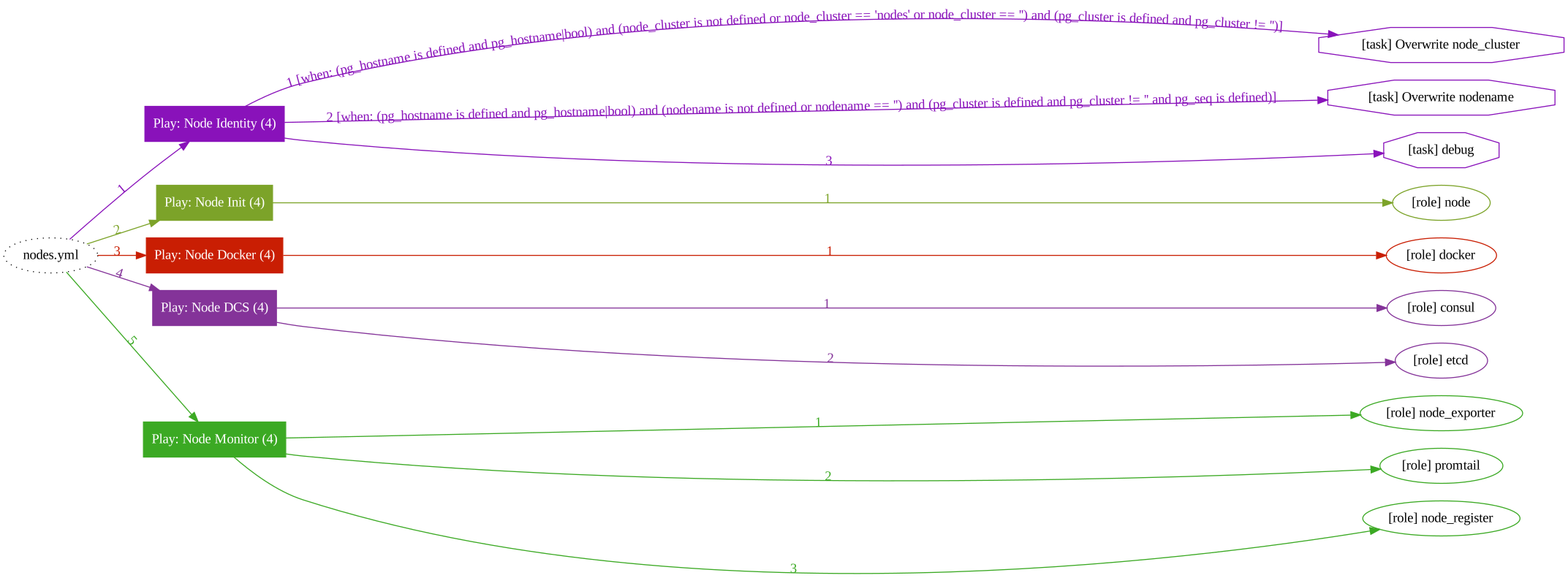
This playbook will run the following tasks:
- Generate node identity parameters
- Provisioning Node
- Configure the node’s hostname
- Configure static DNS records
- Configure dynamic DNS resolver
- Configure yum repo
- Install specified RPM packages
- Configure features such as NUMA/SWAP/firewall
- Configure node tuned tuning templates
- Configure shortcuts and environment variables for the node
- Create node admin user and configure its SSH access
- Configure timezone
- Configure NTP service
- Initialize the DCS service on the node: Consul
- Erase existing Consul if it exists (with protection disabled)
- Initialize the Consul Agent or Server service for the current node
- Initialize the node monitoring component and incorporate Pigsty
- Install Node Exporter
- Register Node Exporter to Prometheus on meta nodes.
Be careful when running this playbook on provisioned nodes. It may lead to the database being temporarily unavailable because of the removal of the consul service.
The dcs_clean provides a SafeGuard to avoid accidental purge. When existing Consul Instance is detected during playbook execution. It will take action about it.
When using the complete nodes.yml playbook or just the section on dcs|consul, please double-check that the -tags|-t and -limit|-l is correct. Make sure you are running the right tasks on the correct targets.
SafeGuard
Pigsty provides a SafeGuard to avoid purging running consul instances with fat fingers. There are two parameters.
dcs_safeguard: Disabled by default, if enabled, running consul will not be purged by any circumstance.dcs_clean: the Consul role fallback and bundled v1.5.1 sandbox inventory set this totrue; set it tofalseand enable the safeguard in protected environments.
When running consul exists, nodes.yml will act as:
dcs_safeguard / dcs_clean |
dcs_clean=true |
dcs_clean=false |
|---|---|---|
dcs_safeguard=true |
ABORT | ABORT |
dcs_safeguard=false |
PURGE | ABORT |
When running consul exists, nodes-remove.yml will act as:
dcs_safeguard / dcs_clean |
dcs_clean=true |
dcs_clean=false |
|---|---|---|
dcs_safeguard=true |
ABORT | ABORT |
dcs_safeguard=false |
PURGE | PURGE |
Selective Execution
You can selectively execute a subset of this playbook through tags.
For example, if you want to re-deploy node monitor components only:
Common tasks are listed below:
Admin User Provision
Admin user provisioning is a chicken-and-egg problem. To execute playbooks, you need to have an admin user. To create a dedicated admin user, you need to run this playbook.
Pigsty recommends leaving admin user provisioning to your vendor. It’s common to deliver the node with an admin user with ssh & sudo access.
It may require a password to execute ssh & sudo. You can pass them via extra params --ask-pass|-k and --ask-become-pass|-K, entering SSH and sudo password when prompted. You can create a dedicated admin user (with no pass sudo & ssh) with another admin user (with password sudo & ssh).
The following parameters are used to describe the dedicated admin user.
The default admin user is dba (uid=88). Please do not use postgres or {{ dbsu }} as the admin user. Please try to avoid using root as the admin user directly.
The default user vagrant in the local sandbox has been provisioned with nopass ssh & sudo. You can use vagrant to ssh to all other nodes from the sandbox meta node.
Refer to: Prepare: Admin User for more details.
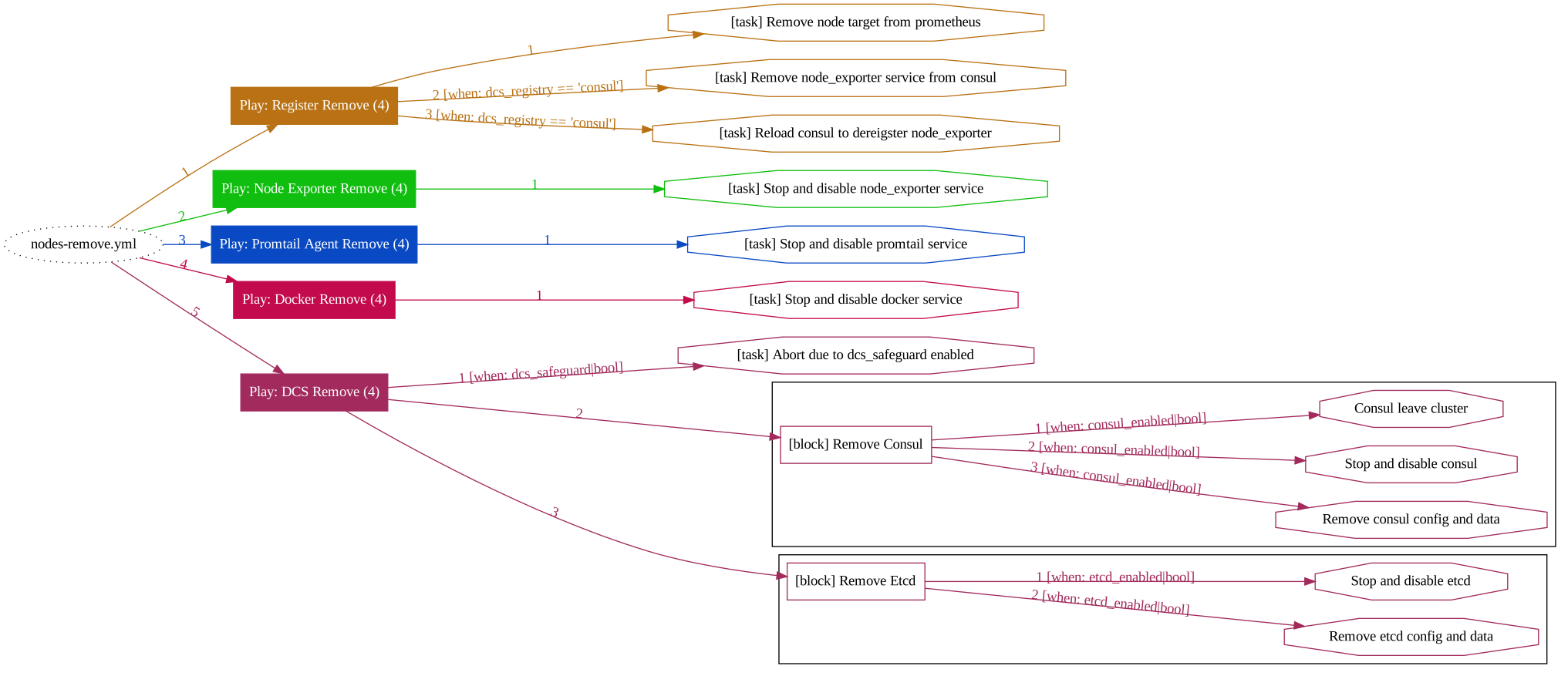
nodes-remove
The nodes-remove.yml playbook is used to remove nodes from Pigsty.
The playbook needs to be executed on meta nodes, and targeting nodes need to be removed.