Installation
It takes 3 steps to install Pigsty: Prepare, Configure, Execute Playbook
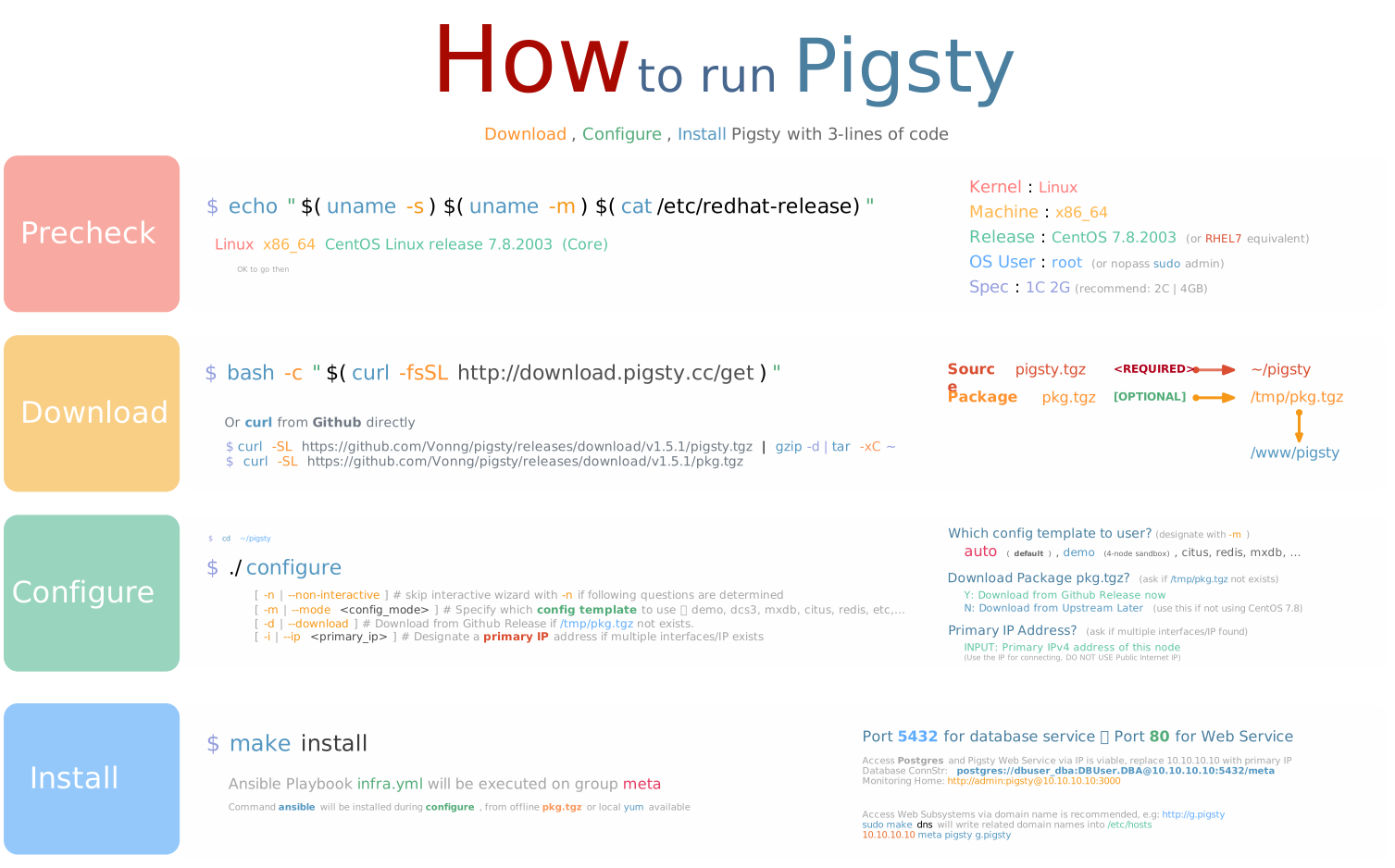
There are two typical modes: Singleton & Cluster Management
- Singleton Meta: Install pigsty on one single meta node. (for PostgreSQL dev/test, RDS monitoring, etc…)
- Cluster Manage: Initiate control from meta node, and manage & monitoring more nodes & databases.
Singleton Meta
When Pigsty is installed on one single node. It will init pigsty infra with a battery including Postgres as CMDB. You may use that database directly.
TL; DR
Prepare a new node : Linux x86_64 CentOS 7.8.2003, with root or sudo access, then download pigsty
If you have available Mac/PC/Laptop/Cloud Account, Sandbox could be handy to create vm for you.
After installation. port 5432 is ready for postgres database connection @ postgres://dbuser_dba:[email protected]:5432/meta.
And a Nginx is serving & proxy all WebUI services @ port 80.
Download Directly via Curl
Access Web Services
Nginx port 80 is the default access endpoint for all Web GUI services. Although it is possible to bypass Nginx add access services directly by port, such as Grafana on 3000, it is highly recommended to use domain names. If you don’t have public domain names, considering use Static DNS on your localhost with make dns.
http://g.pigsty or
http://<primary_ip>:3000is the portal of the monitoring system (username: admin, password: pigsty)
Visit
http://<primary_ip>:3000/ http://g.pigsty to visit Pigsty Grafana (username:admin, password:pigsty)
Cluster Manage
Pigsty can also be used as a controller & monitoring infrastructure for production-grade large-scale nodes & databases.
You can initiate control from meta node, and add more nodes into Pigsty.
You can deploy different types of High available PostgreSQL Clusters, Redis clusters, or Greenplum/MatrixDB data warehouse.
Sandbox
There’s a standard 4-node demo env for pigsty, named ‘Sandbox’. You can create a sandbox on your laptop with Vagrant, or create them on public cloud with Terraform. The same deployment procedure could apply to production deployment.
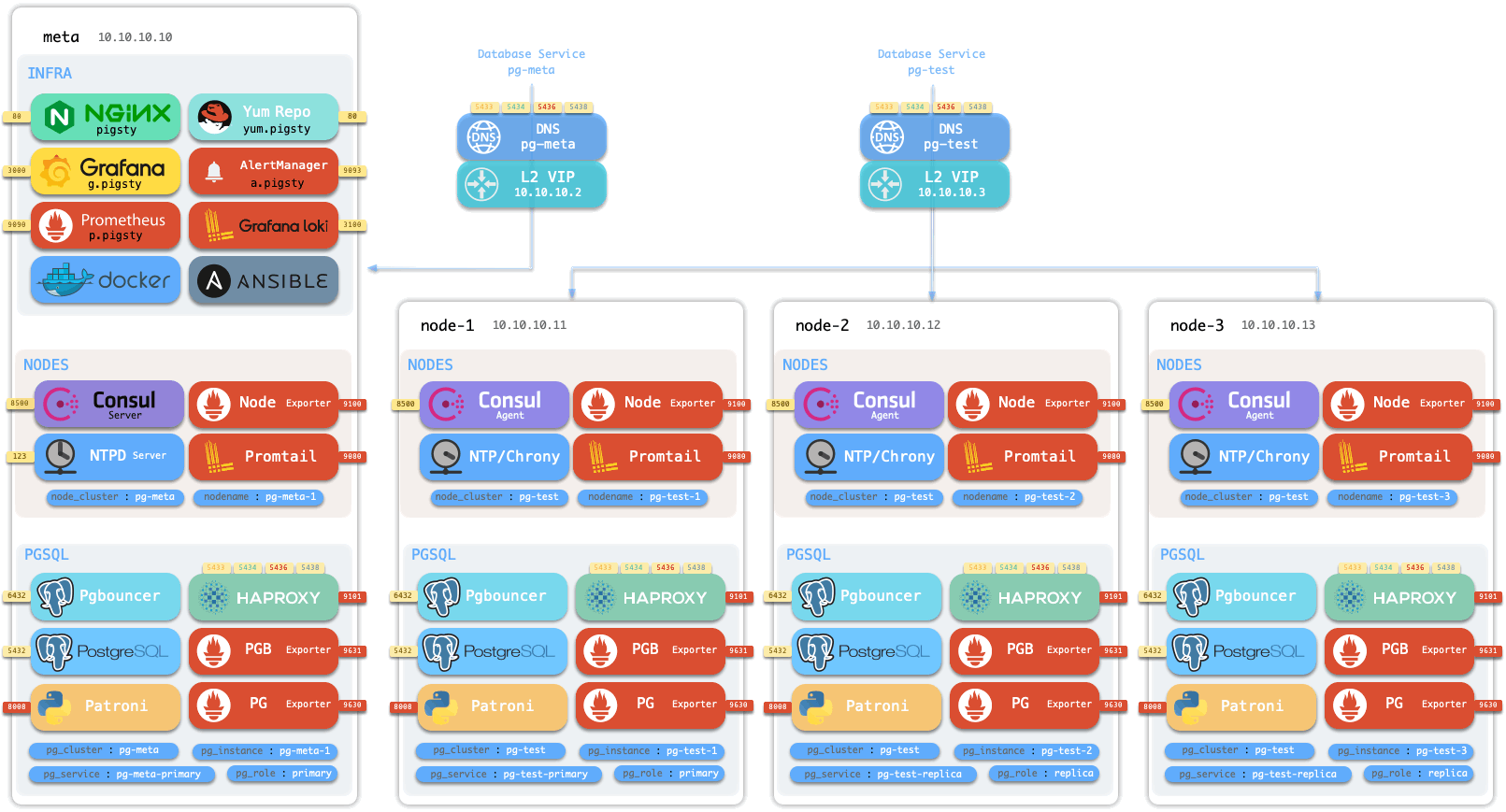
Take sandbox as an example, install pigsty on meta node 10.10.10.10 with:
Nodes Init
Now add 3 more nodes 10.10.10.11, 10.10.10.12, 10.10.10.13 into pigsty nodes.yml
After that, these 3 nodes are set with DCS service, node exporter & promtail logger. And can be used for subsequent database deployment. check Config: Nodes & Playbook: Nodes for details.
PostgreSQL Deploy
Create a classic 1 primary & 2 replicas HA PostgreSQL cluster with pgsql.yml playbook.
Once complete, you can check the newly created PostgreSQL cluster from Monitoring Dashboards.
Check Config: PGSQL, Customize: PGSQL, and Playbook: PGSQL for more details.
Redis Deployment
In addition to the PostgreSQL cluster, you can deploy various other types of clusters and even other types of databases.
For example, to deploy Redis:
Check Config: REDIS and Playbook: REDIS for more details.
MatrixDB Deployment
To deploy the open-source time-series data warehouse MatrixDB (Greenplum7):